

Back to article
3348
Adjusting the tone controls on your product
You can use the audio equalization controls of your product to adjust the sound quality to your liking. Learn how to access the available EQ settings.
Adjusting audio for wall mounting:
If the soundbar has been mounted to a wall, press and hold the Mute button on the remote control for 5 seconds until you hear a tone and the light bar pulses twice. This will enable Wall EQ for improved audio performance when the speaker is in front of a hard surface rather than on top of one. This adjustment can also be made in the Bose app. If you remove the soundbar from the wall, repeat this step return the soundbar to disable Wall EQ.
To increase or decrease the amount of bass or treble produced by your soundbar:
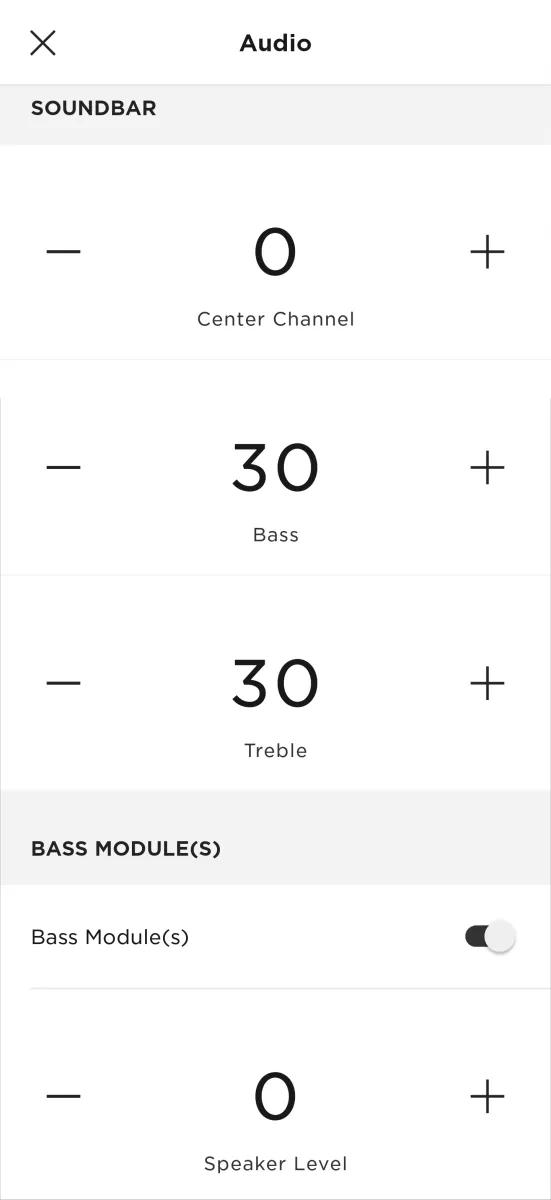
- In the Bose app
, tap the Audio button.
Tip: If a different product is shown, tap the My Bose iconin upper-left corner then select the desired product.
- Under the Soundbar section, tap the + or – buttons to adjust the bass or treble levels in increments of 10 (from -100 to 100).
- If a bass module is connected to the soundbar, its output level can also be adjusted by tapping the + or – buttons under the Bass Module section.
Was this article helpful?
Thank you for your feedback!